
Executive Summary: Traditional web analytics (GA4, HubSpot) classify most AI-driven traffic as “Direct” because AI chat engines strip referrer data. The fastest, most accurate fix is implementing a “First Discovery Source” self-reported attribution field on your primary CRM intake form. By capturing conversational buyer intent alongside standard technical tracking, B2B SaaS teams can measure true AI pipeline influence in a single afternoon.
A prospect tells your sales team, “I found you through ChatGPT.” You check HubSpot Source: Direct. This guide walks through exactly how to fix that—the question to ask, the field to add, the options that matter, and how to build the reporting your marketing team actually needs.
Why This Matters More Now Than It Did 12 Months Ago
Over the last year, something has shifted in how B2B prospects arrive at demo calls.
A growing number of them mention, unprompted, that an AI tool played a role in their discovery: “ChatGPT recommended you when I asked about tools in this space,” or “Gemini gave me a shortlist and you were on it,” or “We were comparing options in Claude and your name came up.” These aren’t rare anecdotes anymore. Sales teams at B2B companies are hearing this on discovery calls with real frequency, and marketing teams have almost no way to see it in their analytics.
Our 4-Layer AI Search Attribution Framework established why this matters strategically. Traditional analytics platforms weren’t built to measure AI-driven discovery, and the gap is widening every quarter. Layer 4 of that framework—self-reported attribution—is the fastest, cheapest, and most reliable way to close it. If you’re new to the space and want the foundation first, our complete guide to AI visibility for B2B brands is the place to start.
This guide is the tactical implementation piece. Not why to measure AI-driven leads, but exactly how to build the system that captures them. Field wording, dropdown options, HubSpot setup, reporting configuration, and what the data should look like at 30, 60, and 90 days.
The Measurement Gap AI Created
Before getting into implementation, it’s worth being precise about what analytics platforms can and can’t see when a lead comes through an AI tool.
Traditional web analytics—GA4, HubSpot’s tracking scripts, Mixpanel, Amplitude—rely on referrer data. When a visitor clicks a link from one website to another, the browser passes along the source URL. That’s how analytics knows a visitor came from Google, LinkedIn, a specific blog post, or an email campaign.
AI tools break this in several ways:
- No consistent referrer from AI chat interfaces. When ChatGPT recommends a brand in an answer, the buyer doesn’t usually click a link inside the chat. They open a new browser tab and type the brand name directly, or Google it. By the time they land on your website, the “AI recommendation” moment is invisible to your tracking. Your analytics attributes the visit to “Direct” or “Organic Search.”
- Cross-device journeys. Many buyers ask AI on their phone during a commute, then look up the recommended brand on their laptop hours later. Even if you had perfect single-session tracking, the two touchpoints happen on different devices and don’t link.
- Non-clicking discovery. For B2B especially, buyers often ask AI for recommendations as part of research they’re doing across multiple sessions. They might see your name in an AI response, note it mentally, and revisit weeks later when they’re ready to evaluate. The gap between AI discovery and website visit can be days or weeks.
- AI Overviews and AI Mode inconsistencies. Even when a buyer clicks through from Google’s AI Overviews or AI Mode, the referrer signal is imperfect. Google’s tracking has improved for AI-generated results, but coverage varies by browser, device, and how the click is initiated.
The result: a growing share of your inbound pipeline is being influenced by AI recommendations, and your CRM has no idea. Most marketing teams are already generating AI-driven leads today but they just can’t see them.
Why Self-Reported Attribution Is the Fastest Fix
Self-reported attribution isn’t perfect. It relies on the buyer accurately remembering how they first heard about you, which is imperfect for anyone who did research over multiple sessions and multiple touchpoints. But it has three properties that make it the fastest fix available:
- It captures intent when technical tracking fails. If a buyer says “AI recommended you,” that’s a data point technical tracking will never produce. Even an imperfect self-report is infinitely more information than “Direct.”
- It requires no technical infrastructure changes. No script installation, no pixel updates, no cross-domain tracking configuration. You add one field to your intake form and one property in your CRM. That’s the entire technical scope.
- It captures data your competitors likely aren’t capturing. For the next 12–18 months, self-reported AI attribution will be an information asymmetry. Marketing teams that implement this early will have visibility into a channel their competitors can’t measure.
The tradeoff is that self-reported data is directionally accurate, not precise. If a buyer clicks through from a LinkedIn post, then asks ChatGPT for validation, then books a demo, they might report either channel or both, if you let them. That’s fine. The goal isn’t to attribute revenue with dashboard precision. The goal is to see, quantitatively, whether AI is playing a role in your pipeline.
Designing the Field: Question, Options, Placement, and Pairing
The Question to Ask (With Exact Wording)
The wording of the question matters more than most teams realize. Here are three variations we’ve seen B2B companies use, ranked from worst to best for AI attribution:
- “How did you hear about us?”(The Standard): This is the standard question most companies use. It has a flaw: buyers often answer with the most recent touchpoint rather than the first touchpoint. If a buyer heard about you from ChatGPT weeks ago, then clicked through from a LinkedIn ad this morning, they’ll often report LinkedIn.
- “Where did you first come across us?”(The Best): The word “first” primes the buyer to think back to their initial discovery moment. This is what you actually want to know for AI attribution—the top-of-funnel moment where AI may have played a role.
- “What made you reach out today?”(The Trigger): This captures the immediate trigger for taking action (the LinkedIn ad, the retargeting email) but misses the earlier discovery moment. Useful for bottom-of-funnel, less useful for AI attribution.
Our recommendation: Use “Where did you first come across us?” as the primary question. Keep the question optional, not required. Required fields on intake forms increase abandonment.
The Dropdown Options That Matter in 2026
Either teams have too few options (forcing buyers into “Other”), too many options (overwhelming the user), or options that don’t distinguish AI-driven discovery from traditional channels. Here is the set of options we recommend for B2B SaaS companies:
AI-Driven Discovery Options:
- ChatGPT recommended you
- Perplexity AI recommended you
- Google Gemini or AI Overviews mentioned you
- Claude or another AI assistant mentioned you
- An AI newsletter or industry digest (Ben’s Bites, Superhuman AI, etc.)
Traditional Discovery Options:
- Google search (not AI-generated)
- LinkedIn (post or ad)
- A colleague or friend
- A podcast or interview
- A blog post or article
- Industry event or conference
- Existing customer referral
Fallback:
- Other—please specify
Strategic Notes on These Options:
- Split ChatGPT, Perplexity, and Gemini separately. Perplexity has grown into a common secondary AI research tool for developer and technical buyers, especially where source citations matter. ChatGPT operates as a general conversational tool, and Google AI Overviews blends into traditional search. Separating these three gives you actionable data on where your Generative Engine Optimization (GEO) investment should go.
- Don’t split “Google search” and “Google AI Overviews” further. Buyers rarely remember the technical interface difference. Keep Google-based discovery in two buckets: “Google search” (traditional) and “Google Gemini or AI Overviews.”
Where to Place the Field
Placement affects both data quality and completion rate:
- Primary intake form: Add the field to your main demo request or contact form. Expect a 40–60% completion rate.
- Post-demo survey: Add the question to a survey sent after the first demo. Response rate is lower (20–30%), but data quality is extremely high.
- Onboarding form after purchase: High completion rate (70%+), but biased toward won deals.
Pair Self-Reported With UTMs for the Full Picture
Always pair this visible self-reported field with hidden form fields that capture standard UTM parameters (utm_source, utm_medium, utm_campaign) and original HTTP referrer data. This allows your CRM to display technical attribution and self-reported attribution side-by-side on the same contact record.
When the two disagree—technical tracking says “Direct” but self-reported says “ChatGPT”—that’s not a data problem. That’s exactly the AI-influenced pipeline visibility you’re trying to build. The disagreement is the signal.
Full HubSpot Implementation Walkthrough
Step 1: Create the Custom Contact Property
In HubSpot, navigate to Settings → Properties → Contact properties. Click “Create property.”
- Object type: Contact
- Group: Marketing information (or custom “Attribution” group)
- Label: First discovery source (Self-reported)
- Internal name: first_discovery_source_self_reported
- Field type: Dropdown select
- Options: Enter each dropdown option listed above.
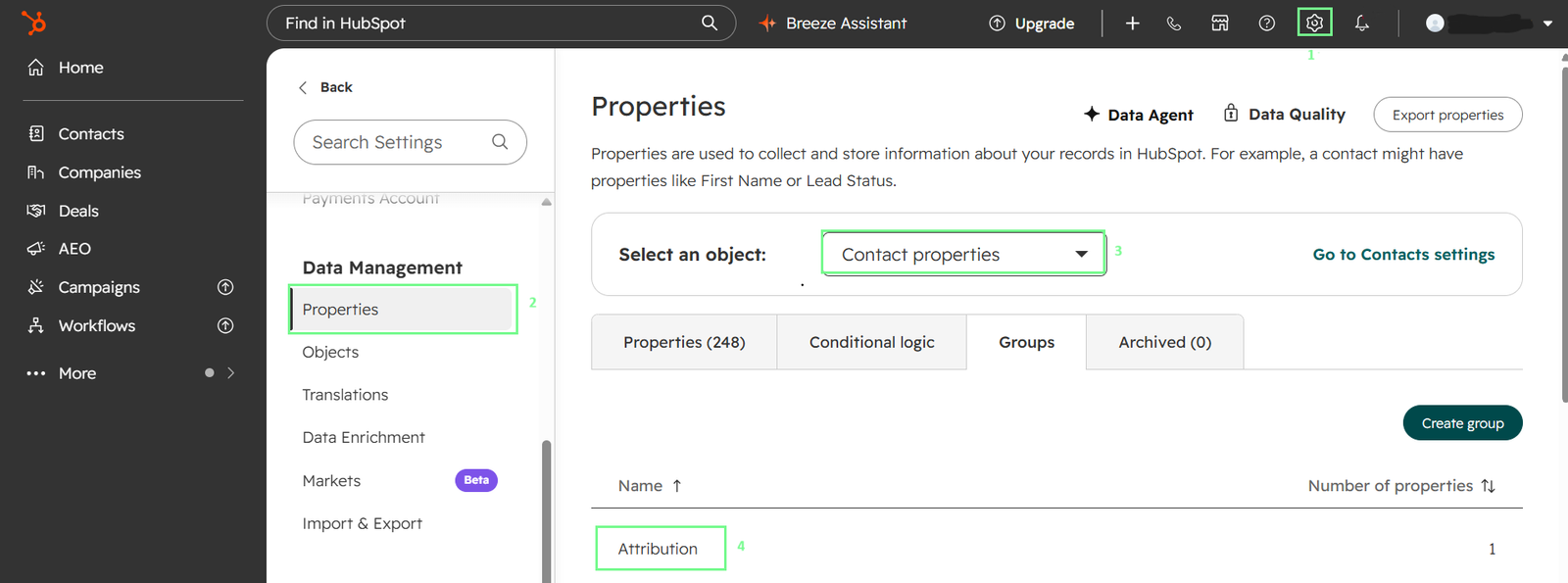
Figure 1: The custom contact property that captures self-reported AI attribution — created in HubSpot Settings → Properties → Contact properties.
Step 2: Add the Field to Your Primary Intake Form
Navigate to Marketing → Forms. Open your primary demo form and add the property.
- Field type: Dropdown
- Required: No
- Label displayed to buyer: “Where did you first come across us? (Optional)”
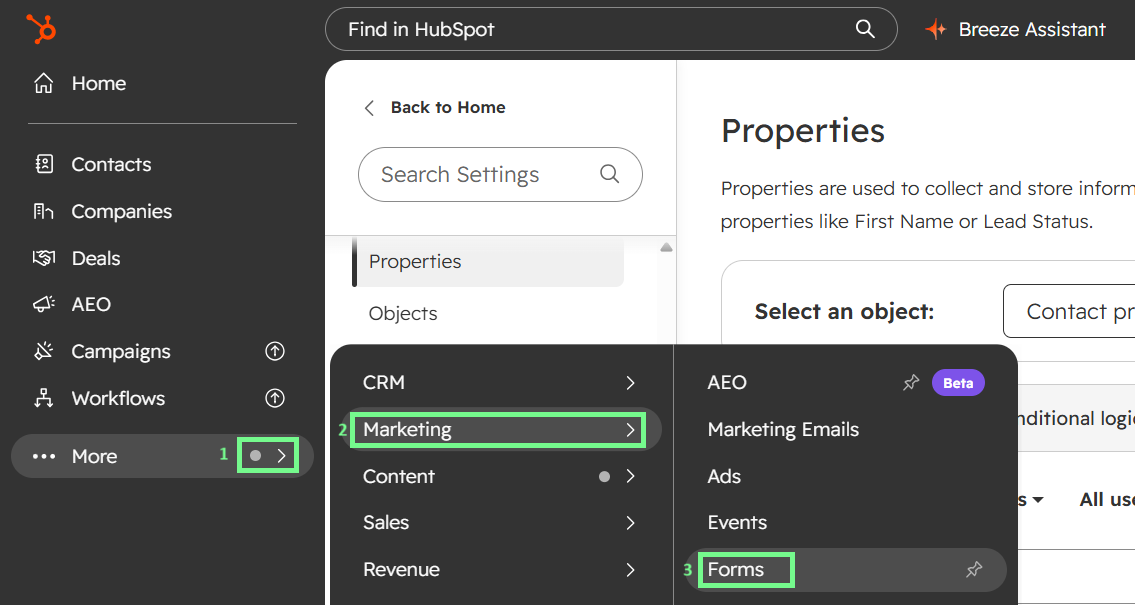
Figure 2: Access your intake forms via HubSpot’s More → Marketing → Forms navigation menu.
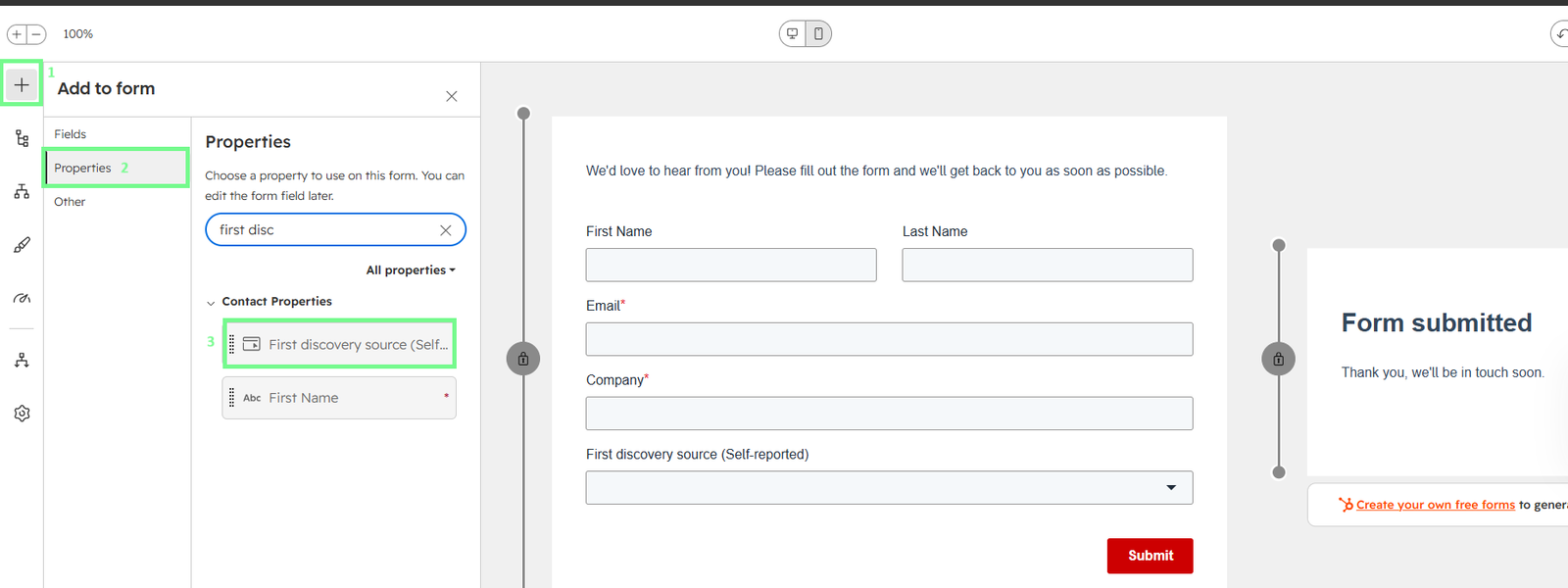
Figure 3: Search for the “First discovery source (Self-reported)” property and drag it onto your form — the live preview shows the new dropdown field in place.
Note on the next step: HubSpot’s interface changes over time and looks different across tiers (Free, Starter, Professional, Enterprise). Rather than showing screenshots that won’t match every reader’s portal, we’ve written these steps as instructions that work across any HubSpot setup.
Step 3: Set Up Workflow Tagging
Navigate to Automation → Workflows → Create workflow.
Set the enrollment trigger to First discovery source (Self-reported) is known.
Add branching logic that sets a secondary Boolean property called AI-influenced lead to Yes if the self-reported source is any AI-related option (ChatGPT, Perplexity, Gemini/AI Overviews, Claude, or AI Newsletter). This gives you a clean True/False filter for high-level pipeline reporting.
Step 4: Update Your Lead Scoring Model
AI-influenced buyers often arrive pre-qualified—they’ve already done research and shortlisted you against alternatives before reaching your form. That makes it tempting to weight AI-reported leads higher in your scoring model from day one. Hold off. You don’t have the conversion data to justify a specific weighting until you’ve been collecting it for 60–90 days.
For now, add the AI-influenced lead Boolean as an available input in your lead scoring model without assigning it a positive or negative weight. Once you have 90 days of data comparing AI-reported leads against other channels on conversion rate and deal size, revisit the weighting and set it based on what your data actually shows.
Step 5: Build the Reporting Dashboard
Build four key widgets on an “AI Attribution” dashboard:
- Self-reported source breakdown (Last 30 days)
- AI-influenced pipeline funnel (Leads with AI-influenced lead = Yes vs. opportunities and closed-won revenue)
- AI attribution trend (6-month line chart)
- AI attribution by ICP (Segmented by company size or industry)
Advanced: Automating Attribution with HubSpot Data Agent (Breeze AI)
Historically, if a buyer skipped the self-reported attribution field on your form, capturing that data required manually listening to recordings.
With HubSpot’s Data Agent (Breeze AI), you can transform your static First discovery source property into an automated Smart Property. The AI reads sales call transcripts in the background and populates the field whenever a prospect verbally mentions an AI engine.
Consent Note: Before enabling AI analysis of call transcripts, confirm your call recording consent flow covers AI processing. Two-party consent jurisdictions (California, Illinois, Washington, most of the EU) may treat AI transcript analysis differently from standard CRM data use. This is a quick check with your legal team, not a blocker but worth doing before you turn it on.
Pricing & Availability Note: Data Agent features are available on HubSpot Starter, Professional, and Enterprise tiers and run on a usage-based HubSpot Credits system.
How to Configure the Smart Property
- Navigate to Settings > Properties > Contact properties and click Edit on your First discovery source (Self-reported) property.
- In the left sidebar under the Data Agent header, click Smart property prompt.
- Check the box labeled Fill property using Data Agent.
- Set Where should this data come from? to Activities and transcripts.
- Set Activity type to Call Transcripts.
- In the What do you want to know? text box, paste the prompt pasted below:
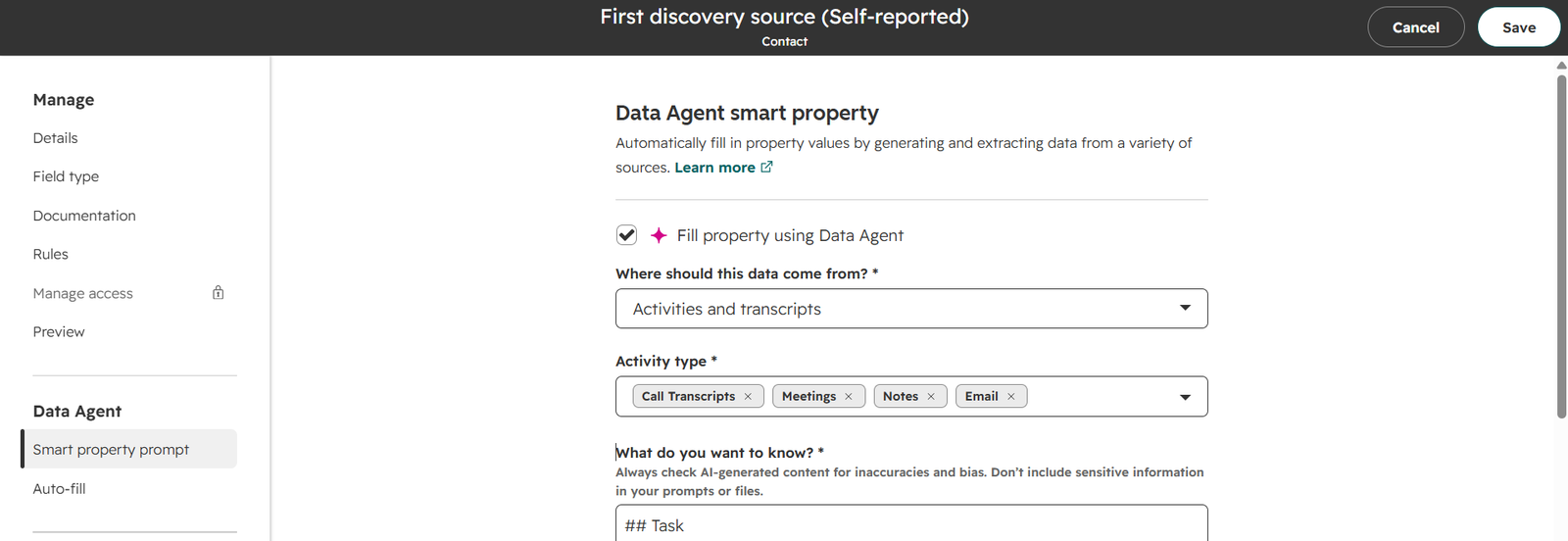
Figure 4: How to configure the Smart Property prompt so HubSpot’s Data Agent auto-populates the attribution field from sales call transcripts
Pro Tip: Click the “Suggest prompt” button at the bottom of the window. HubSpot’s Data Agent will read your dropdown choices and automatically generate a baseline prompt. To ensure strict data integrity and prevent false positives, refine HubSpot’s draft using our field-tested template below:
## Task
Determine the contact's **first discovery source (self-reported)** using only what the contact (or their representative) explicitly stated in engagements.

## What to look for
Review the contact's engagement content (especially **call transcripts**, and also any relevant **call notes/emails/meeting notes** if present) for explicit statements about how they first found, heard about, or researched our company. Identify phrasing such as:
* "I found you on...", "I heard about you from...", "I came across you via...", "I searched...", "I asked [an AI tool]...", "Someone recommended you...", "I saw your post/ad on LinkedIn...", "I listened to your podcast/interview...", "I read your article/blog..."

## Rules for choosing the value
* Set the property to the **single best-matching allowed value** reflecting the contact's **first**
discovery source.
* If multiple explicit sources are mentioned, prefer the **earliest self-reported discovery source (chronologically earliest engagement statement)**.
* Use only **explicit self-reporting**; **do not infer** from UTMs, referral data, company info, or speculation.
* Map the contact's wording to the closest allowed value. Examples of mapping guidance:
  * Mentions of using **ChatGPT** to find/research us -> choose the ChatGPT option.
  * Mentions of **Perplexity** -> choose the Perplexity option.
  * Mentions of **Google Gemini** or **Google AI Overviews** -> choose the Gemini/AI Overviews option.
  * Mentions of **Claude** or another AI assistant (when not clearly one of the above) -> choose the Claude/another AI assistant option.
  * Mentions of an AI-written recap/newsletter/AI-generated digest where they saw us -> choose the AI-generated summary/newsletter option.
  * Mentions of **Google search** / "Googled you" without saying AI Overviews/Gemini -> choose the Google search (not AI-generated) option.
  * Mentions of **LinkedIn** (post or ad) -> choose the LinkedIn option.
  * Mentions of a **colleague/friend** recommendation -> choose the colleague/friend option.
  * Mentions of a **podcast/interview** -> choose the podcast/interview option.
  * Mentions of a **blog post/article** -> choose the blog post/article option.
* If the engagement content does not contain a clear, explicit self-reported discovery source, **leave the property blank**.

## Output
Return **exactly one** allowed value (or **blank** if unknown).- Use the Preview result tool at the bottom to select a few recent contact records and test the output against actual engagement data.
- Once you’ve verified the output is accurate, click Save in the top right corner.
Applying This Beyond HubSpot
The framework doesn’t change with the CRM. Salesforce, Pipedrive, Close, and Attio users can apply the same pattern:
- A custom picklist field for the self-reported source
- A workflow rule (or Flow, in Salesforce) that sets the AI-influenced Boolean
- Hidden UTM fields captured in parallel
- Lead-to-opportunity reporting that ties AI-reported leads to closed revenue
The CRM changes. The measurement framework doesn’t.
Reporting: How to Actually Use the Data
Data is only useful when it changes decisions. Here’s how B2B marketing teams can use self-reported AI attribution data.
Monthly Review – Track the AI Channel Trajectory
The most important number is the trend of AI-reported leads month over month. If AI-reported leads are growing as a percentage of total pipeline, that channel is growing in importance for your business and deserves proportionally more investment. If it’s flat, that’s data too—it tells you where your entity signals may need work.
Quarterly Review – Compare Conversion and Deal Size
Are AI-reported leads converting to demos at a higher or lower rate than LinkedIn-reported leads? Are their eventual deals larger or smaller? Do they have shorter or longer sales cycles? This is where you learn whether AI is bringing you your best buyers or your most casual browsers. Most B2B teams we’ve worked with find AI-reported leads convert at a higher rate because the buyer has already done research and pre-qualified themselves but this varies by ICP.
Engine-Level Optimization
Once you have 60–90 days of data, look at the split between ChatGPT-reported, Perplexity-reported, and Gemini-reported leads. If one engine dominates for your ICP, that tells you where to focus your Generative Engine Optimization work and where to prioritize the entity signals that shape how AI engines evaluate your brand. At OddScrew, we track this through our Citation Score framework (OCS), which measures brand visibility engine by engine. Different engines reward different signals; treating them as one channel wastes optimization budget.
Sales Enablement
Feed AI attribution into the sales process. When a lead reports an AI source, note it on the contact record. When your sales team sees this pre-call, they can ask a natural question during discovery: “You mentioned finding us on Perplexity—what specific prompt or comparison were you running?” The qualitative color from those conversations often produces the sharpest insight into what’s actually driving AI recommendations for your brand.
What the Data Looks Like at 30, 60, and 90 Days
Realistic expectations by timeline help you diagnose whether the setup is working correctly.
- At 30 days: You’ll have partial data, enough to see whether the field is being answered at all. Aim for 40%+ completion rate. If less than 5% of respondents are selecting AI options, either your ICP genuinely isn’t AI-influenced yet, or your field placement isn’t capturing enough qualified leads.
- At 60 days: Patterns emerge. You should be able to see the rough distribution across channels and identify which AI engines are showing up most often. Compare this to your competitors’ likely positioning—if a specific engine is over-indexing in your data, that’s a signal about where your entity signals are strong.
- At 90 days: Full baseline. You can now compare AI-reported leads to other channels on conversion rate, deal size, and sales cycle length. You’ll have enough sample size to identify seasonality patterns and set realistic targets.
Signs your field wording is off: If 20%+ of respondents are selecting “Other” and their specifications don’t reveal a new pattern, your primary options may be poorly labeled. If completion rate is under 30%, the field is probably confusing or feels intrusive. Revisit the wording.
Signs your options list needs updating: If specific “Other” specifications appear multiple times per month (like “Meta AI” or a new engine), promote them to dedicated dropdown options. Review the options list quarterly.
Layering Self-Reported Attribution With Your Other Measurement Layers
Self-reported attribution is Layer 4 of the 4-Layer Attribution Framework. It works best when combined with the other three layers.
Layer 1 (Referrer analysis) catches AI-influenced traffic that does click through with a referrer. GA4’s native “AI Assistant” channel (added May 2026) automatically classifies sessions from ChatGPT, Gemini, Claude, and Copilot. HubSpot analytics catches some AI Overviews clicks and any direct clicks from ChatGPT’s cited sources. Coverage is improving but still partial as many AI clicks arrive without a usable referrer.
Layer 2 (Direct traffic decomposition) segments your “Direct” traffic bucket to identify AI-influenced patterns—unusual spikes correlated with content publication, geographic patterns, or search-term matching. This catches AI-influenced leads that don’t self-report and don’t arrive with a referrer at all.
Layer 3 (Brand search velocity) tracks branded search query volume in Google Search Console—first-party data, not third-party keyword tools. When AI recommendations increase your brand’s visibility, branded search often grows as buyers verify what they’ve heard. It’s a useful directional signal, though a weakening one: AI Overviews increasingly answer branded queries directly without a click, and many buyers now go straight from an AI recommendation to your site without searching your brand name at all. Google’s new Generative AI performance reports in Search Console (launched mid-2026) add visibility into AI-specific impressions. As of now, the reports show impressions only—no clicks, no queries—so they complement Layer 3 rather than replace it.
Layer 4 (Self-reported attribution)—what this guide covered—captures buyer intent when technical tracking fails completely.
When Layer 4 disagrees with Layers 1–3, don’t assume one is wrong. They measure different things. If your analytics shows 3% of traffic from AI referrers but your self-reported data shows 15% of leads reporting AI, both are likely accurate because AI’s influence extends far beyond click-throughs, and self-reported data captures the buyers who never clicked at all.
The full picture only emerges when you look at all four layers together.
Common Mistakes to Avoid
- Making the field required. Tanks form completion rates. Keep it optional.
- Too many dropdown options. Overwhelms buyers. Stay between 10 and 14.
- Vague wording. “How did you hear about us?” produces noisier data than “Where did you first come across us?” Precision in the question produces precision in the data.
- Not updating options as new AI tools emerge. Perplexity, Copilot, Meta AI, and newer entrants will need their own dropdown options over time. Review the list quarterly.
- Not sharing the data with sales. Self-reported attribution data is most valuable when it changes the sales conversation. Make sure your sales team can see the field on the contact record before their first call.
- Weighting AI-reported leads without evidence. Don’t automatically score AI-reported leads higher until you have 60–90 days of conversion data to justify the weighting.
- Treating self-reported data as ground truth. It’s directionally accurate, not precise. Combine it with Layers 1–3 for the fuller picture.
What Comes Next in AI Attribution
The measurement space is evolving quickly. A few developments worth watching:
Standardized AI referrer headers. There’s ongoing discussion in web standards groups about how AI chat interfaces should pass referrer information when users click through. If this standardizes, more AI-influenced traffic will be catchable in Layer 1 analytics. Self-reported attribution will still remain necessary for the non-click majority.
Browser-level AI attribution. Some browsers are experimenting with API-level attribution that tracks whether a URL was accessed after an AI recommendation. Early days, but worth watching.
AI-specific analytics platforms. New tools are emerging that specialize in measuring AI-influenced traffic and mentions across LLMs. These will supplement, not replace, the self-reported data your own forms produce.
Improved sales-conversation AI analysis. Tools like Gong and Chorus are getting better at auto-tagging AI-related conversation moments. In the next 12 months, expect these tools to surface AI attribution signals from calls without manual audit work—complementing what HubSpot’s Data Agent already does.
Self-reported attribution will remain foundational through all of this. It’s the layer that captures buyer intent when everything else fails.
Ready to See Where AI Is Sending You Leads?
Setting up self-reported attribution is one part of the picture. Understanding where your brand actually shows up in AI recommendations is the other.
We run complimentary AI visibility audits for B2B brands—a quick assessment of your entity clarity, citation readiness, and recommendation status across AI engines like ChatGPT, Perplexity, and Gemini.
[Request your free AI visibility audit→]
If you’re already convinced AI-influenced pipeline is worth investing in and want to see how OddScrew works with B2B SaaS teams to build it systematically, our GEO service page walks through the OddScrew Citation Score framework, and our Pricing page breaks down the Foundation, Growth, and Scale tiers.
This guide is part of OddScrew’s ongoing content on AI visibility and attribution for B2B brands. Related reading: What Is AI Visibility? · The 4-Layer AI Search Attribution Framework · AEO Glossary